Cartero 26.0 released
Published on
With some delay, 26.0 is here.
This release was scheduled for December. Unfortunately, as I was preparing the release, my build farm broke. Some VMs stopped booting, some scripts stopped working… I was about to leave for a Christmas trip, so I had to give up on releasing on time.
During January, I configured a new build pipeline to fix this. Rather than patching my scripts again, this one is completely new and has some notable changes that are going to make releasing a version easier for me. But more on that later.
First, let’s get to the new features.
Color themes
Cartero 26.0 introduces initial support for color themes.
You can use the appearance settings to customize the color scheme in use by the application. Not only the text editors are affected by this change: the whole user interface will tint using the colors from the colorscheme. Fancy.
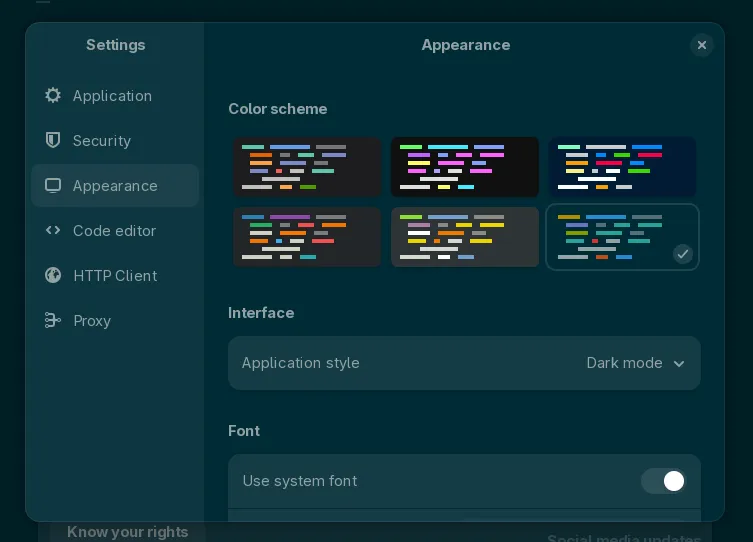
This initial version ships with the default colorschemes provided by GtkSourceView: Adwaita, Solarized, Kate, Cobalt and Tango/Oblivion.
More color schemes will be available in future releases. I know it is possible, because I have successfully sideloaded the XML styles from GNOME Builder and the results have been successful. But I’d like to find a better solution than copying files from other projects, like creating my own XML templates using an ANSI palette as a source.
Stay tuned, we are close to see modern themes like Catpuccin or Nord.
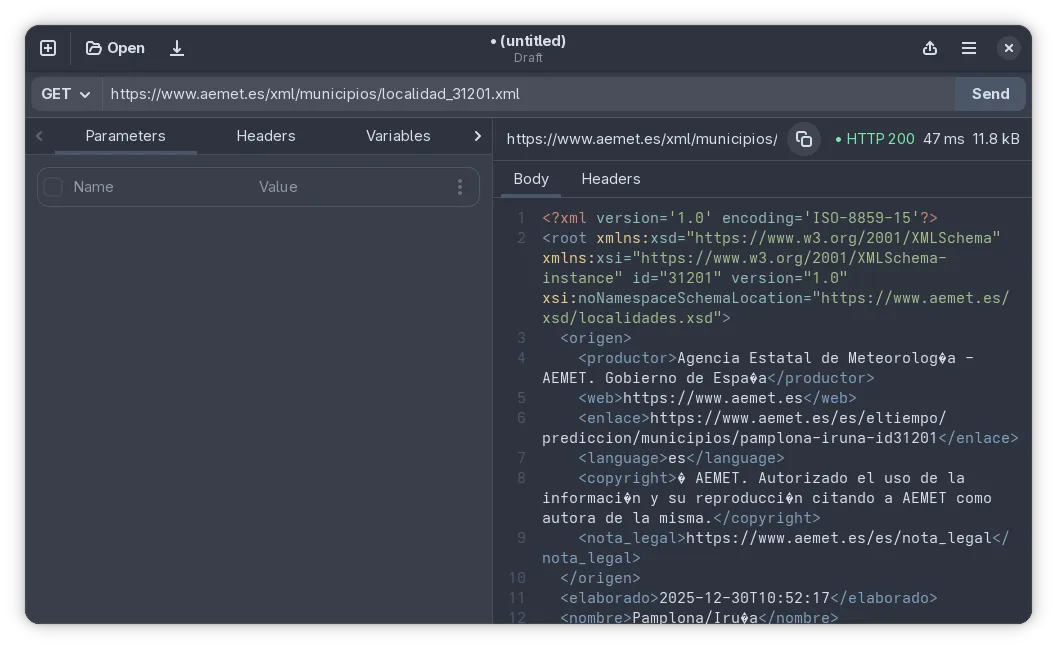
NOTE: For those who don’t like window tinting: in the future there will be a way to disable this feature (or to make it more subtle, like only coloring the header bar). This will be of interest of Windows 11 users. I am aware right now window tinting is being applied at the same time as the Microsoft Mica tweaks, so colors may look odd in some cases. A fix is in progress!
Effective URL for a response
It has always been difficult to see the actual URL that is being requested in Cartero, specially when the URL has variables or the response follows a redirection.
As of 26.0, when a request is made, the effective URL (the one that returns the content in the response area) will be presented on top of the response panel. You can inspect it and you can use the copy button to take it somewhere else.
Concealing and revealing env variables
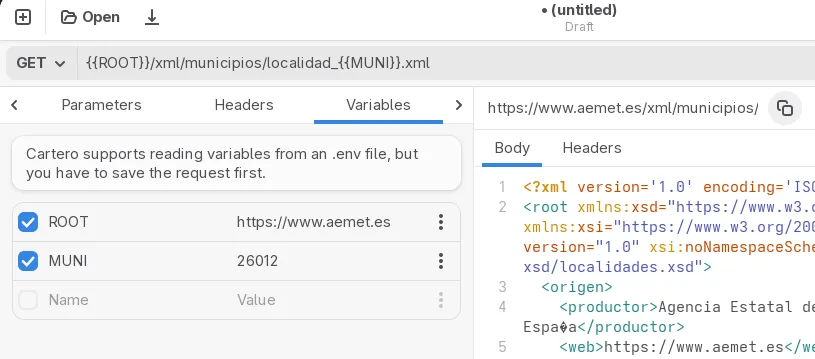
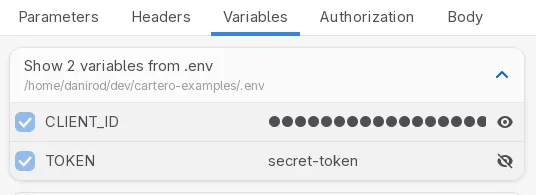
Cartero 25.0 added support for .env files. You can use this feature to keep secrets out of your collections, or to share variables between your main application and the collection files.
However, in the initial support for this feature, the values of .env variables were always masked as passwords and hidden. It makes sense, because you don’t want to accidentally leak your secret tokens if you are sharing your screen.
But this is inconvenient if you need to quickly inspect the value of a variable. Starting with 26.0, the values for the .env variables will continue to be hidden by default, for privacy reasons, but if you press the eye button, you will be able to reveal and conceal the value for that variable.
Duplicating requests
Another painpoint is that when you are working on an API, you usually have multiple endpoints, and having to create new files from scratch and copying some things from one file to another can be tiresome.
In Cartero 26.0, there is a new menu option that you can use to duplicate a request. When you duplicate a request, a new untitled tab is opened, just like when you press the New button. However, the data from the tab you duplicated gets also transfered to the new one. It’s like using the Save as menu, but on a separate tab.
This will make a whole lot of sense the day we have stuff like collections or folders or something like that, but it is also useful for standalone requests.
Localization changes
Cartero is now available in Simplified Chinese! This translation landed a few days after releasing 25.0 so it did not make it on time. And due to all the delays to cut this release, it has been waiting for a long time. I am sorry!
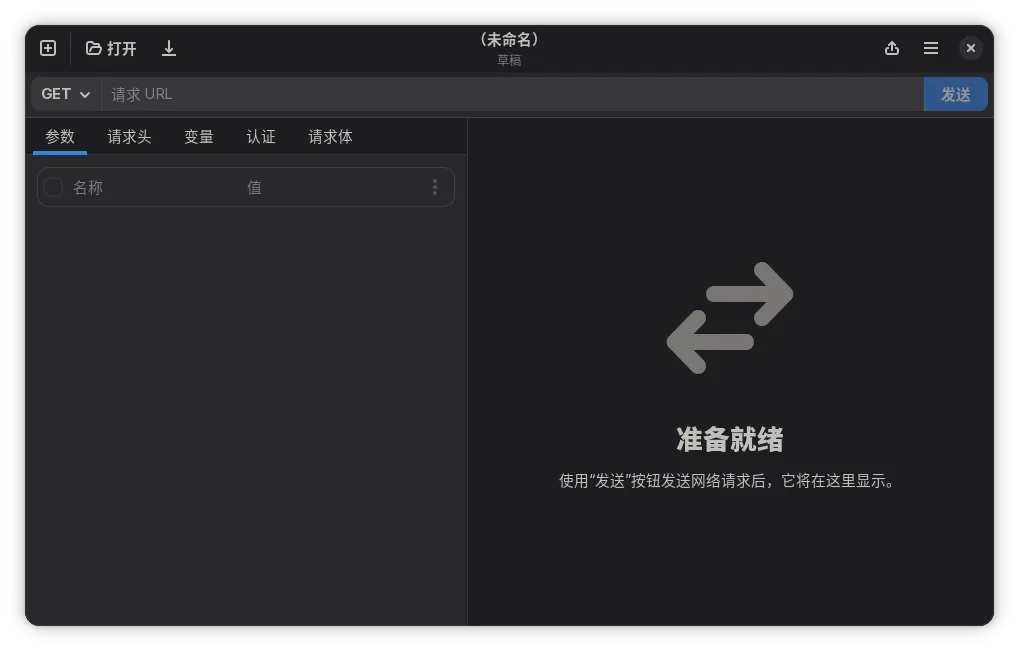
Thank you to @CloneWith, who provided the translations through our Weblate project. Just like the rest of the contributors who have also provided translations in other languages in this iteration: Indonesian, Basque and Brazilian Portuguese.
What happened to the build farm
While I was preparing for the release of the unsuccessful 25.1 (which never happened), the build farm I use to create binary packages of Cartero broke. The VM I use to create the signed Windows version I upload on every release stopped booting. The macOS script I use to download and vendor GTK and other system dependencies also stopped compiling due to a macOS update (of course).
This happened unfortunately days before leaving for a Christmas trip, so I had no chance to fix the process before the end of the year. 2025 ended, and the version had to bump to 26.0… because that’s part of the rules that I set myself.
Some people may be surprised that I actually compile the Cartero .exe or .dmg files you use in my own computer instead of using some automated CI/CD environment. However, to sign the Windows version I have traditionally used a codesign certificate that lives in a physical smartcard. I cannot use the cloud to compile Cartero because I need to be able to plug the smartcard to the computer.
However, this January, instead of renewing the smartcard certificate, I decided to just switch to a cloud signing product offered by the vendor who provides the certificates I use. This means that I could finally move the build process to the cloud, as long as I could teach the scripts how to login to the sign environment — which I did.
The new build farm is also more efficient and will allow me to release a version of Cartero in less than 30 minutes, instead of the 4 to 5 hours that took me to release a version before. It is also fully automated, so there is no space for human error. You cannot imagine how many times I had to restart a build process because I forgot to pass a Meson flag!
And because it is stateless and there are no VMs to maintain, it will break less often. And when it does, it will break earlier, not in the very last minute.
This makes releasing easier, and will allow me to have shorter release cycles. This time for real. My goal is one release per month. If there is a critical bug to patch, or if there is a new translation added, the release will come earlier.
shell-ng status
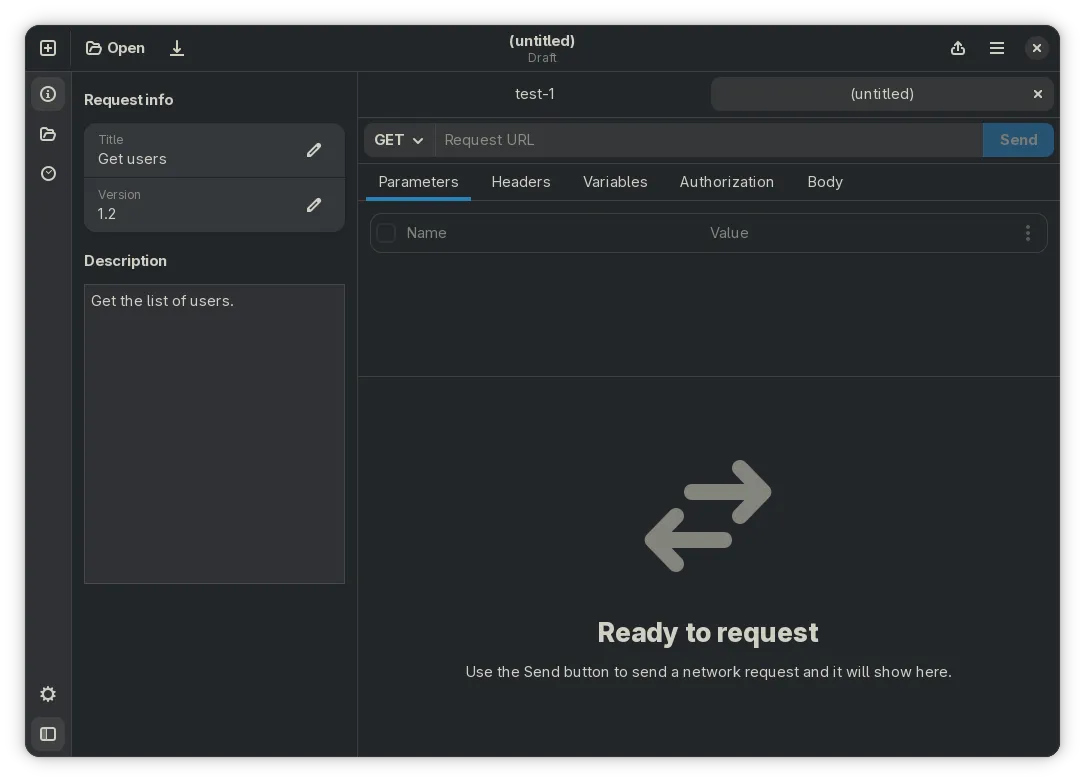
I am still working on the new shell. This will be discussed in a deeper technical post, but I am starting to understand why most Electron apps do not support more than one window. Making sure that the state of each window does not conflict is a challenge!
I am working on an action bar too. It will pair perfectly with the new shell to provide services like collections (you have to believe!) or a folder explorer, but it will also provide other stuff like a request history, and eventually stuff like a cookie jar or an environment manager. Here is a prototype on how it could look (this is not finished):
Wrapping it up
That’s it! Get Cartero 26.0 from your usual install or update channels and please report any feedback or bugs you might find.
Considering that this is the first release using the new build farm, report a bug if things stop working like they used to do. I have done a lot of QA on the artifacts to make sure that they still work as expected and nothing should break. But if something unexpected happens, make sure to report it to have it fixed!
You can report bugs in the issue tracker or by pinging @cartero@floss.social in Mastodon or wherever you connect to the fediverse.
Making HTTP requests and testing APIs should be affordable again. That's why I am building Cartero, the free and open source HTTP client that you can use to develop and test APIs.